About CMP Installation
CMP Converged Monetisation Platform. The MDS Global product that supports customer care and billing for digital service providers. is delivered as a set of components that are RPM packages and it is installed and deployed by running an Ansible playbook.
The installation repository for CMP is available on the CMP host in the cloud (https://vault.mdsglobal.dev/), accessible via HTTPS with the credentials provided by MDS Global, according to the customer In the context of the Cloud Monetisation Platform, an individual or organisation who has signed an agreement to take goods and services from a service provider. A customer receives a bill associated with one or more subscriptions, and can be a single end user or a large company with many subscriptions assigned to one agreement.'s contract. It includes the following:
- YUM and Maven repositories, which store the RPM packages and database package, as well as the Ansible Playbook package used for deployments.
You need download only the Ansible playbook package to the control server. The RPM and database packages are deployed automatically when you run the playbook.
RPM packages
The RPM is a program for installing, uninstalling, and managing software packages in Linux A well-known widely used open source operating system.. The RPM portion of this term comes from the fact that .rpm is the default extension for files used by the program.
Because CMP components are delivered as RPM packages, this dictates where in the operating system each file is deployed. It is not possible to deploy components anywhere else on the host file system.
In addition, the RPM-based deployment does not allow more than one instance of a component to a host. For example, you cannot install multiple instances of the AgentView The graphical user interface of the CMP that is typically used by Customer Service Agents to access CMP customer and billing data. In versions prior to CMP 8.0, this was called the CMP GUI. Interfaces Layer on the same host.
For more information, see https://rpm.org/.
Yum Repository
CMP RPM packages are stored in YUM and Maven repositories.
YUM (Yellowdog Updater, Modified) is an open-source command-line package-management utility for computers using the RPM Package Manager. YUM Repositories are warehouses of RPM package files that can hold RPM packages locally or remotely.
Ansible
Ansible is a configuration management tool. Although it can be run in ad hoc mode to run commands manually like any command line interface tool, it is usually used to automate the manual tasks of configuration and installation, such as shutting down and restarting hosts, installing packages and components, and deploying configurations.
Ansible is agent-less and communicates with hosts using SSH (Secure Shell) for Unix/Linux and WinRM for Windows installations. For CMP purposes, SSH is used.
For more information see https://docs.ansible.com/.
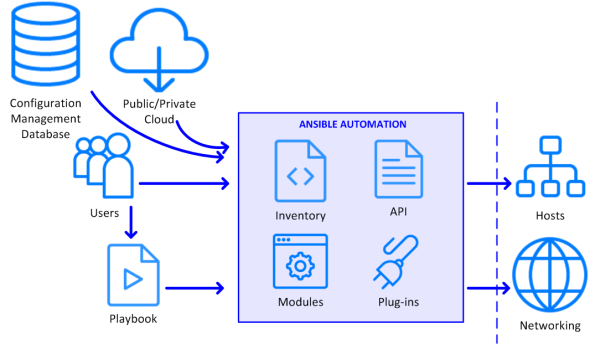
Ansible Architecture
CMP deployment uses Ansible automatic installation, which involves the following concepts:
Control Server
For CMP purposes a control server is a server that runs Linux and has Ansible installed. You use it to run commands and playbooks.
Playbooks
A playbook is an ordered list of tasks, which are run sequentially. Playbooks can declare configurations, but they can also orchestrate steps of any manual ordered process, even as different steps must move back and forth between machines in particular sequence.
For more information, see https://docs.ansible.com/ansible/latest/user_guide/playbooks_intro.html.
Playbooks are written in YAML (YAML Ain't Markup Language), which is a human-readable data serialisation language that is simple to use and commonly used in configuration files. CMP provides playbooks for the installation and deployment of CMP components.
For more information, see https://yaml.org/.
Each task in the playbook is a unit of action and correlates to a single command that you would run in ad hoc mode. Tasks invoke one or more modules, which are the units of code executed by Ansible. Each module has a particular use, such as file management, package management and remote execution. Ansible provides an extensive list of modules for most common tasks and you can also write your own. CMP provides modules for the installation and deployment of CMP components.
For more information, see https://docs.ansible.com/ansible/latest/modules/modules_by_category.html.
Inventory File
An inventory file is a list of the target hosts (or managed nodes in Ansible terminology). That is, they are the machines on which you want to install the CMP components. The inventory file uses variables (properties) to describe the desired state of the target hosts. The hosts can be grouped and nested, usually according to their role or function, such as database or web server, or load balancer, for example.
The inventory file is created and modified using the Inventory Configuration Tool.
A number of host groups have been predefined for CMP; see the Groups table in Prepare the Inventory File for more information.
CMP provides a YAML inventory file template (template.yaml) that you must copy and edit to suit your deployment.
For more information, see Prepare the Inventory File
The following slideshow describes how the control server, playbook and inventory file are used to deploy CMP:
CMP Automatic Deployment Process
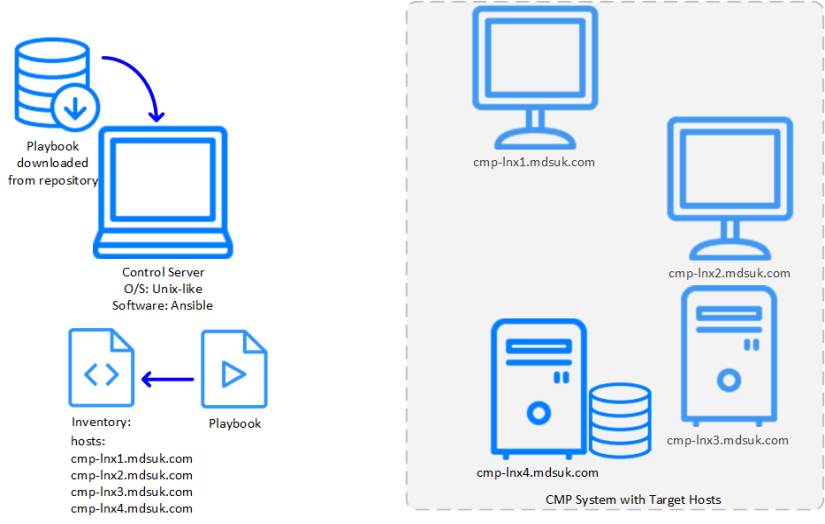
Download and unzip the Ansible Playbook package to the control server (controller node) and prepare the inventory file using the Inventory Configuration Tool by supplying the host names and properties.
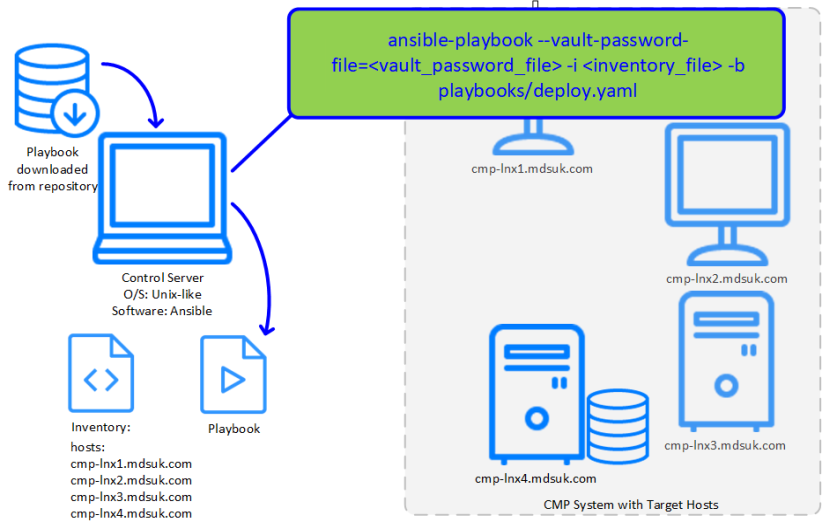
Run the command to execute the deployment playbook.
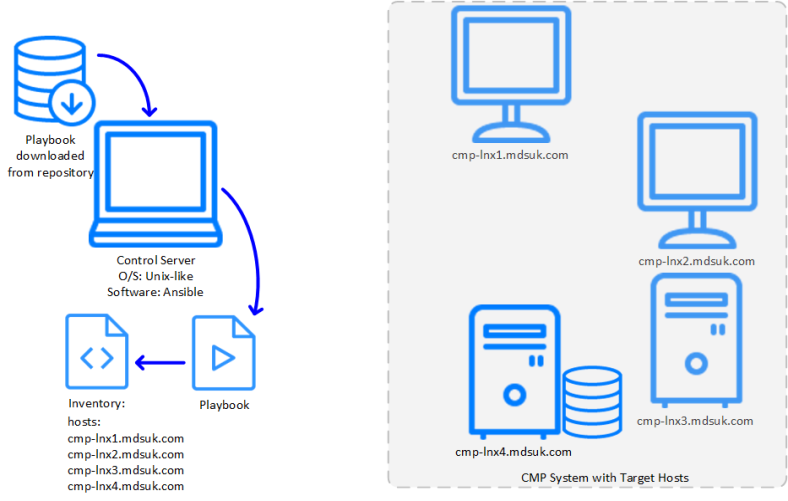
As Ansible runs step by step through each task in the playbook, it encounters deployment instructions for groups of hosts. It consults the inventory to determine the list of specific hosts and what configuration is required for each.
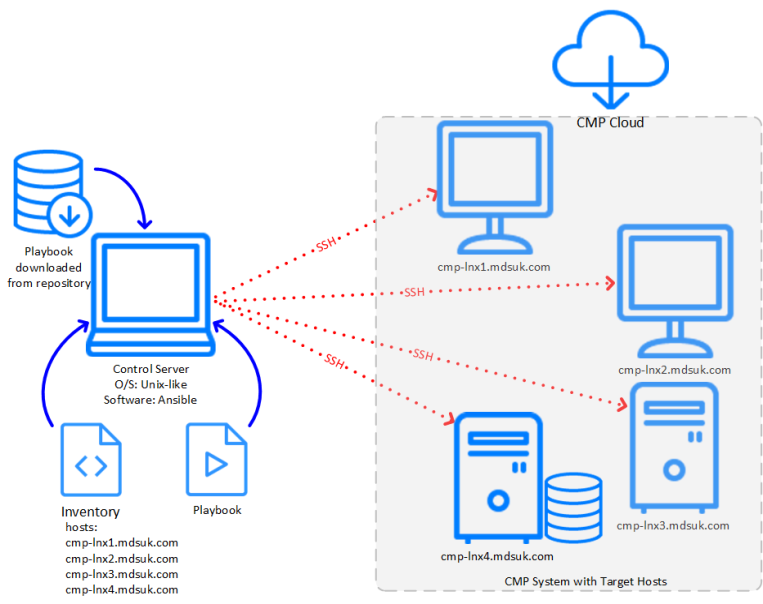
Having identified the hosts, the control server communicates the configuration and deployment instructions to the hosts via SSH The hosts access the CMP installation repository in the cloud and deploy the required packages and configuration.